Scaling is the fundamental precondition for deploying modern web applications for a global audience. It enables to have fault tolerance, more request handling, and better response time with parallel computation.
To understand scaling and deployment of a service in Kubernetes cluster:
We will create a sample Spring Boot service
Create its image and push it to the Docker repository
Deploy it over Kubernetes cluster to run it in a Pod
To scale it to multiple instances, we will create ReplicaSet
To manage rollout to different versions of the same service, we will create a Deployment
If our latest version of services has critical bugs, we will roll back our deployment
Create an Image
Let’s create a sample Spring Boot application.
| |
Create the Dockerfile for image creation.
| |
Create a docker image using:$ sudo docker build -t omkarshetkar/spring-service:v1 .
Push the image to remote docker repository:$ sudo docker push omkarshetkar/spring-service:v1
Deploy Image in Kubernetes Cluster with Pod
Now, to have this image deployed in the Kubernetes cluster, we need to create a Pod.
A Pod is the smallest deployable resource in the Kubernetes cluster. It represents a collection of containers and storage volumes that share the same execution environment.
There are two ways to create a resource in Kubernetes.
Imperative
It is used for quick tests, debugging, or applying hotfixes in the cluster.
Declarative
The preferred and recommended approach to create resources for production. Here, manifest files are created having configuration details of the specific resource.
To create a Pod with imperative commandkubectl run spring-service --image=omkarshetkar/spring-service:v1
To create with declarative configuration, create the following pod.yaml:
| |
kind <– Specifies the type of resourcemetadata.labels <– Label to identify Pod
A label is a key/value pair.
Every resource in Kubernetes can have one or more labels.
Labels help in grouping the resources in various combinations irrespective of their specific kind.
Create the Pod by applying the configuration:$ kubectl apply -f k8s/pod.yamlpod/spring-service created
List the pods:
``` $ kubectl get pods
NAME READY STATUS RESTARTS AGE
spring-service 1/1 Running 0 78s
| |
$ curl http://localhost:8080/greet
Hello from v1
| |
apiVersion: apps/v1
kind: ReplicaSet
metadata:
name: spring-service-rs
labels:
app: spring-service-rs
spec:
modify replicas according to your case
replicas: 3
selector:
matchLabels:
app: spring-service-v1
template:
metadata:
labels:
app: spring-service-v1
spec:
containers:
- name: spring-service-container
image: omkarshetkar/spring-service:v1
ports:
- containerPort: 8080
| |
Inspect ReplicaSets:
| |
ReplicaSet is showing as 3 Pods are in the ready state.
Let’s list the Pods, and see their status:
| |
As expected, 3 instances of Pods are running.
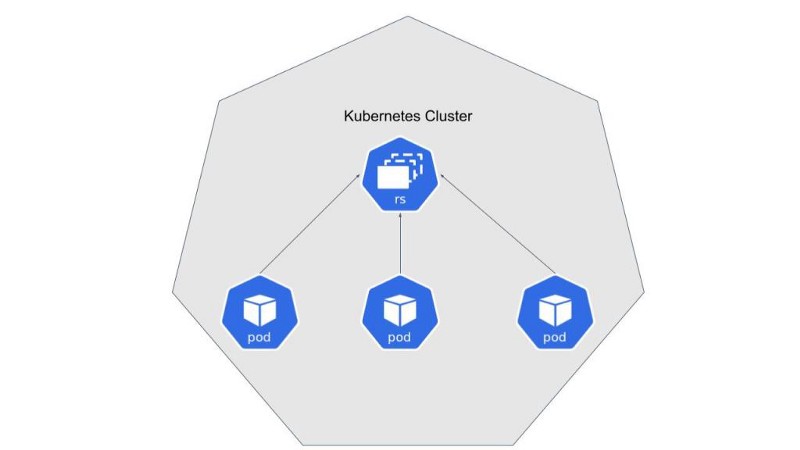
How do I scale up/down the ReplicaSet?
To scale up to 4 pods, we can achieve it in either imperative or declarative way.
Imperatively:
| |
Declaratively, will modify replicaset.yaml (preferred approach):
| |
To delete a ReplicaSet:
| |
It will delete ReplicaSet along with associated Pods.
Rollout/Rollback with Deployment
What if I want to upgrade my service from v1 to v2 and deploy the same in the cluster?
ReplicaSets manage a single instance of service. To manage multiple instances and their rollouts, we need to have Deployment object.
Deployment enables rollout and rollback to different versions of service with less/no downtime.
Deployment configuration deployment.yaml will be as follows:
| |
As you might have noticed, the specification for ReplicaSet and Deployment is almost similar except for the kind attribute value.
ReplicaSet is for scaling of a single instance of service whereas Deployment is for managing the scaling of multiple versions of a particular service.
To create Deployment:
| |
Let’s see how deployment is listed:
| |
As expected, 3 pods are created and available.
Also, notice every Deployment will have associated ReplicaSet created. It exists as long as the corresponding Deployment exists.
| |
Scaling commands for Deployment are similar to that for ReplicaSet.
Following imperative command will scale down to 2 instances.$ kubectl scale deployments spring-service-deployment --replicas=2
The same can be achieved through a declarative change in the configuration file.
To see it working, let’s export the port for Deployment:
| |
| |
Upgrade service from version v1 to v2
Make a change in service:
| |
Create a new image for version v2 and push it to remote Docker repository:$ sudo docker build -t omkarshetkar/spring-service:v2 .$ sudo docker push omkarshetkar/spring-service:v2
Now, let’s refer new image in our deployment.yaml:
| |
Applying the changed configuration:
| |
Let’s export the port for Deployment and see the API response:
| |
| |
As expected, we are seeing changes done for v2.
Note that for service upgrade, we needed to do a single version change in
deployment.yamland everything else is taken care of by Kubernetes.
Let’s make another change in service and upgrade to v3.
As expected, we can see the following API response:
| |
Rollout history for a Deployment can be seen by:
| |
Kubernetes assigns a revision number for every new deployment. It helps in the rollback of deployment to a particular version.
Rollback
Let’s say something went wrong in v3 of service and want to rollback to the previous version. Is it possible?
Yes!
| |
Now, if you see API response, it will be for v2:
| |
Finally, we can delete the deployment with:
| |
Or declaratively:
$ kubectl delete -f k8s/deployment.yaml
Deletion of a deployment deletes associated ReplicaSet and Pods.
Thus, for scale and flexible deployments, we need to have Deployment resources. Effectively, we need to define only Deployment resources and Pod template, which will, in turn, define ReplicaSet and Pod.
Code for the above discussion is available here.
The way to roll out the changes with no/less downtime is a topic for a separate discussion.